Import your book
Everything starts with the companies you already work: clients, tenants you've placed, prospects you've been chasing. Add them once and AgentCRE watches them from then on.
 1
2
1
2
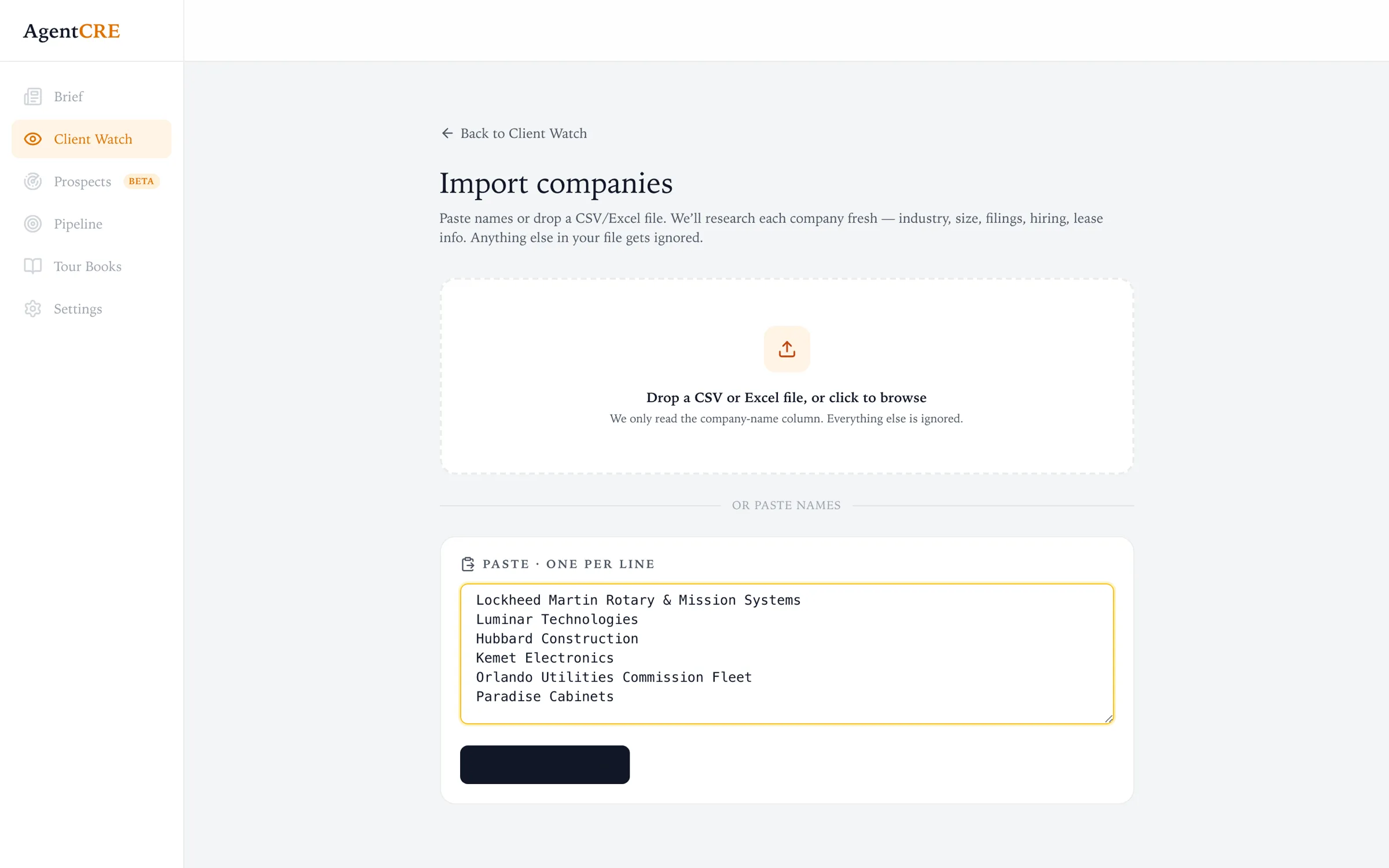
- 1Drop a CSV or Excel fileA CRM export or CoStar list works as-is. AgentCRE finds the company-name column and ignores the rest.
- 2…or paste names, one per lineNo website or address needed. Each name is looked up and matched to the real company: industry, size, locations.
- 3Research starts right awayYour first companies are scanned as soon as you import, so your first Brief fills in the same day. Large books keep filling in over the following days.
The morning email
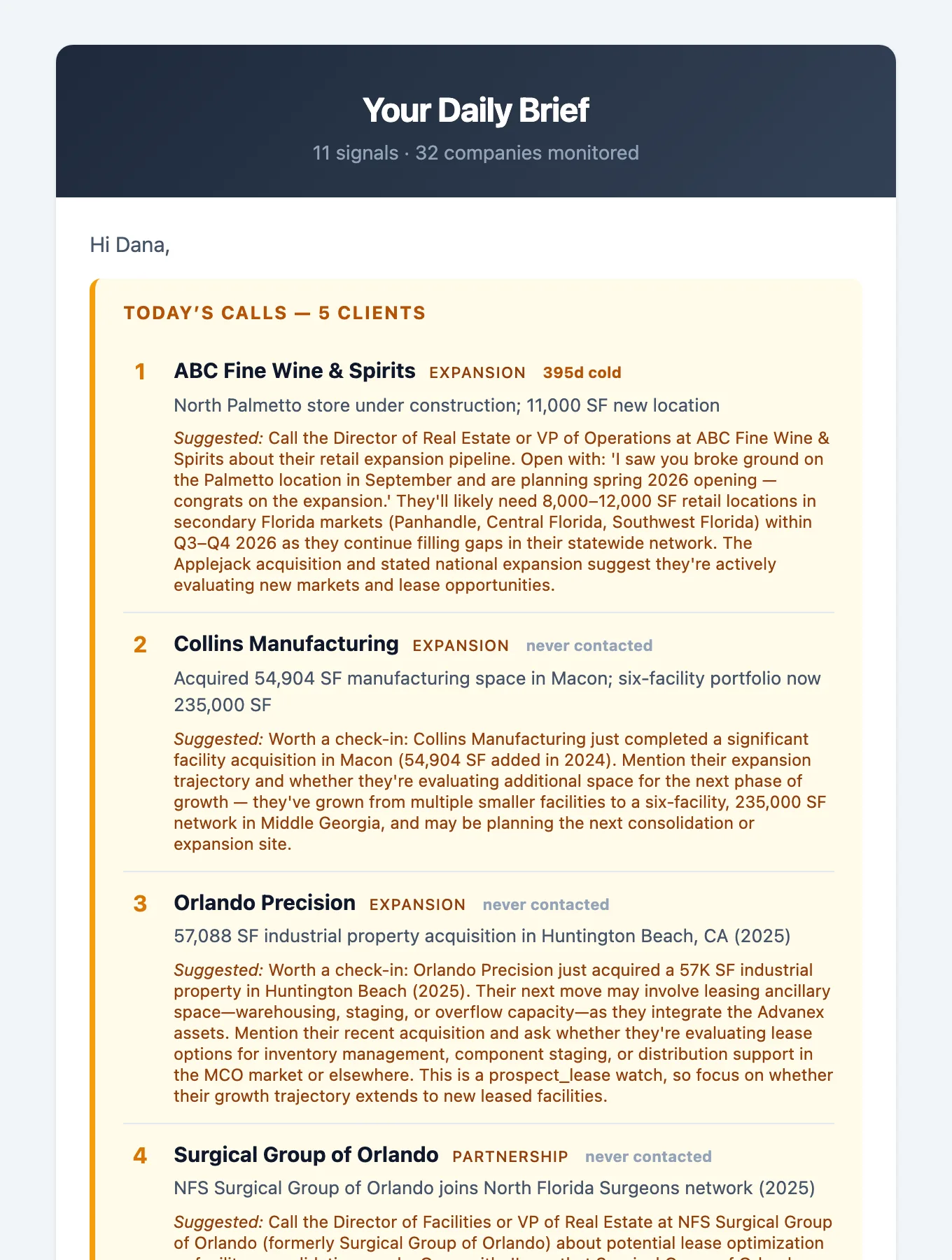
You don't have to log in to know who to call. Each morning the Brief arrives in your inbox, already ranked, with a suggested opener for each company.
 1
2
3
1
2
3
- 1Today's callsThe clients most worth a call today, in order. The subject line tells you how many before you open it.
- 2How cold the relationship is"395d cold" means it's been over a year since you last logged a conversation. A long gap moves a company up the list.
- 3What to sayEvery call comes with an opener built from the actual event, e.g. "I saw you broke ground on the Palmetto location…"
- 4Open Daily BriefThe button at the bottom opens the full list in the app, where you can act on each one.
Reading the Brief
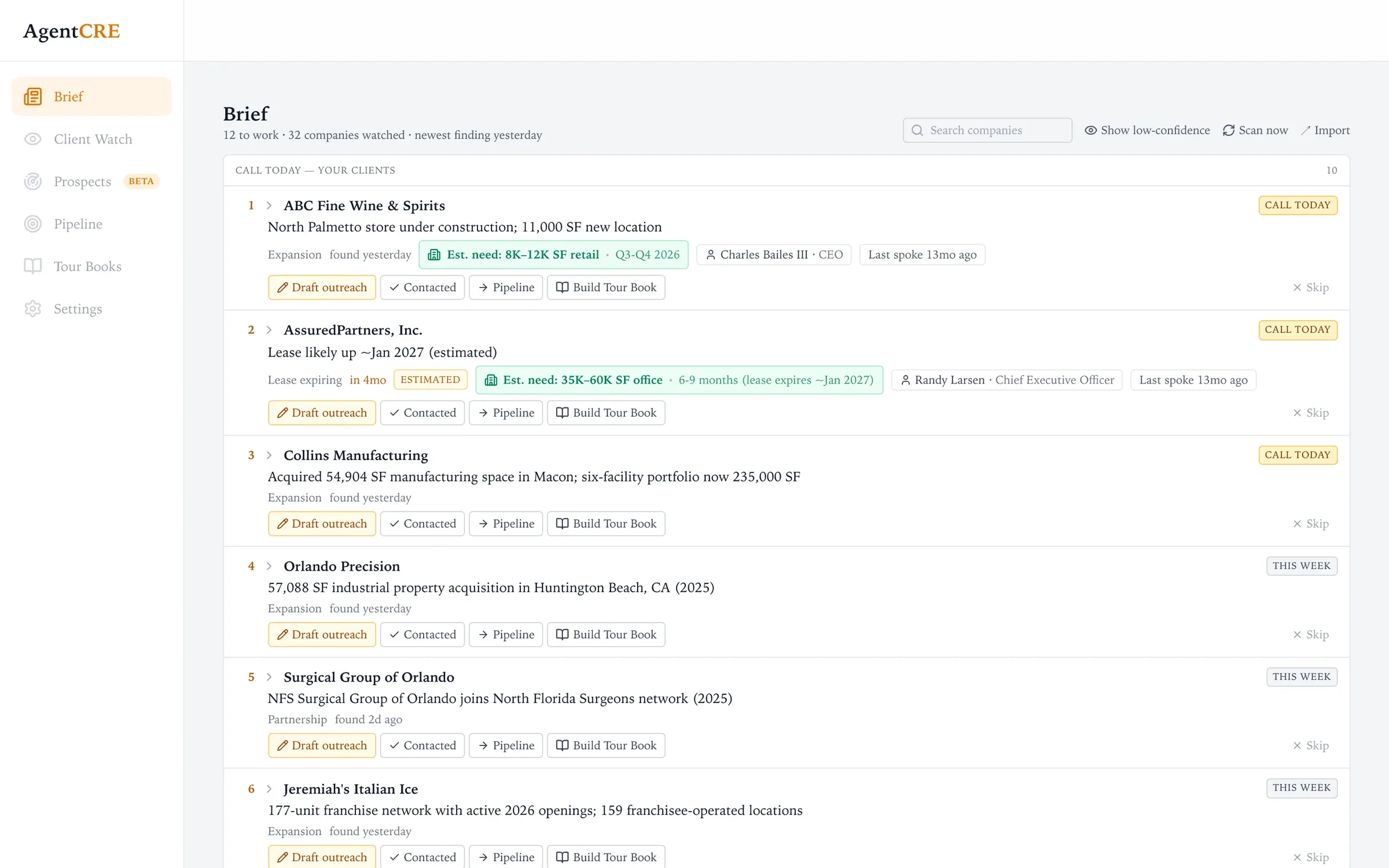
The Brief is your home screen: a ranked call list for the companies you watch. Each row gives you what you need before you pick up the phone. To find new companies to add, use Prospects.
 1
2
3
4
5
6
1
2
3
4
5
6
- 1Your day at a glanceHow many clients to work, companies watched, and when the newest finding came in. Search and Import sit at the right.
- 2PriorityOnly the top few rows earn Call today. Hover a chip to see why, e.g. "Dated deadline ~4 months out."
- 3The headlineWhat happened, in one line: a new store, an acquisition, a lease coming up. Click it to open the details.
- 4Estimated space needHow much space the event likely means, what kind, and when, so you know if it fits the deals you do.
- 5Who to call & how coldThe best decision-maker we found, plus when you last spoke to the company.
- 6One-click actionsDraft outreach, mark Contacted, add to Pipeline, build a Tour Book, or Skip. See the next section.
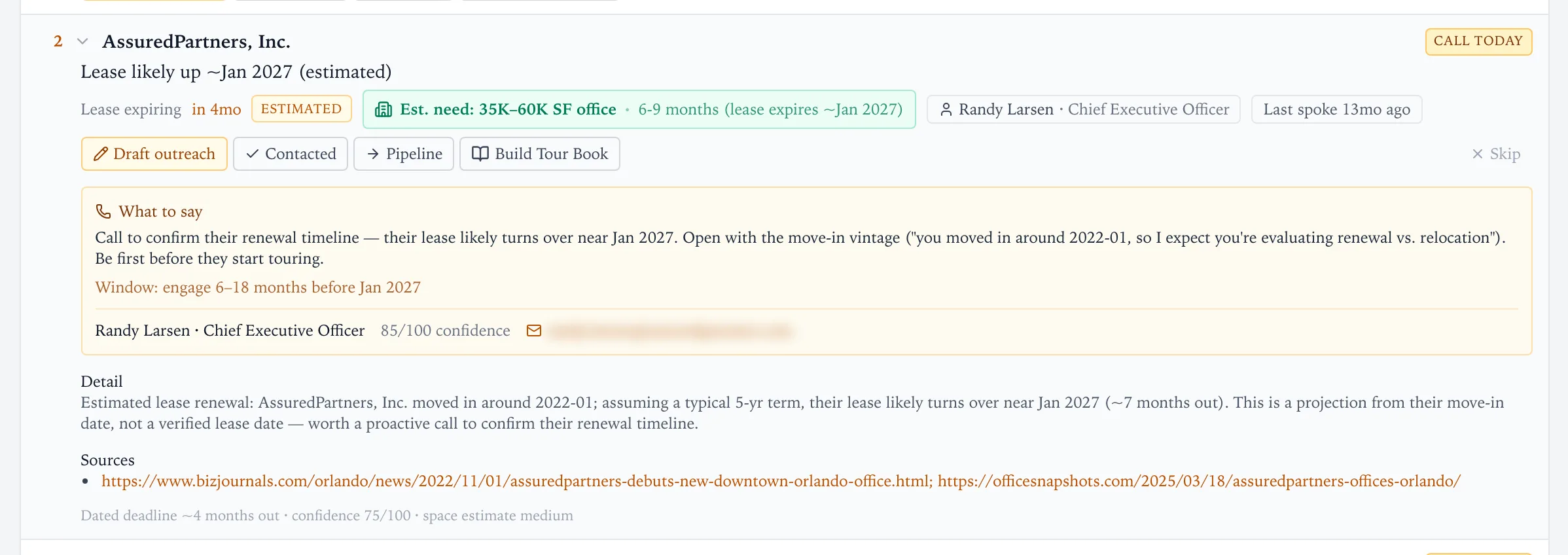
Open a row to see the call script
 1
2
3
4
1
2
3
4
- 1Honest labelsEstimated means the date is projected (here, from when the tenant moved in), not read off a lease.
- 2What to sayA call script tied to the event, and the window to act in: "engage 6–18 months before Jan 2027."
- 3The contactName, title, a confidence score for the match, and a clickable email or phone number.
- 4SourcesEvery finding links to where it came from, so you can check it before you call.
What the labels mean
The top of your list, with a real reason and timing to act now.
Worth a touch in the next few days. A good event, just less urgent.
Background on the company. Good to know, not a reason to dial.
How much space the event probably means, and what type.
A projected date or figure. Confirm it on the call.
When you last logged a conversation. Long gaps rank higher.
The Brief shows only findings worth acting on. To see everything AgentCRE found, including weaker background items, turn on Show low-confidence in the header. Those rows are tagged LOW.
Acting on a signal
Every row carries the same five buttons. Each one updates the list, so tomorrow's Brief reflects what you did today.
| Button | What happens |
|---|---|
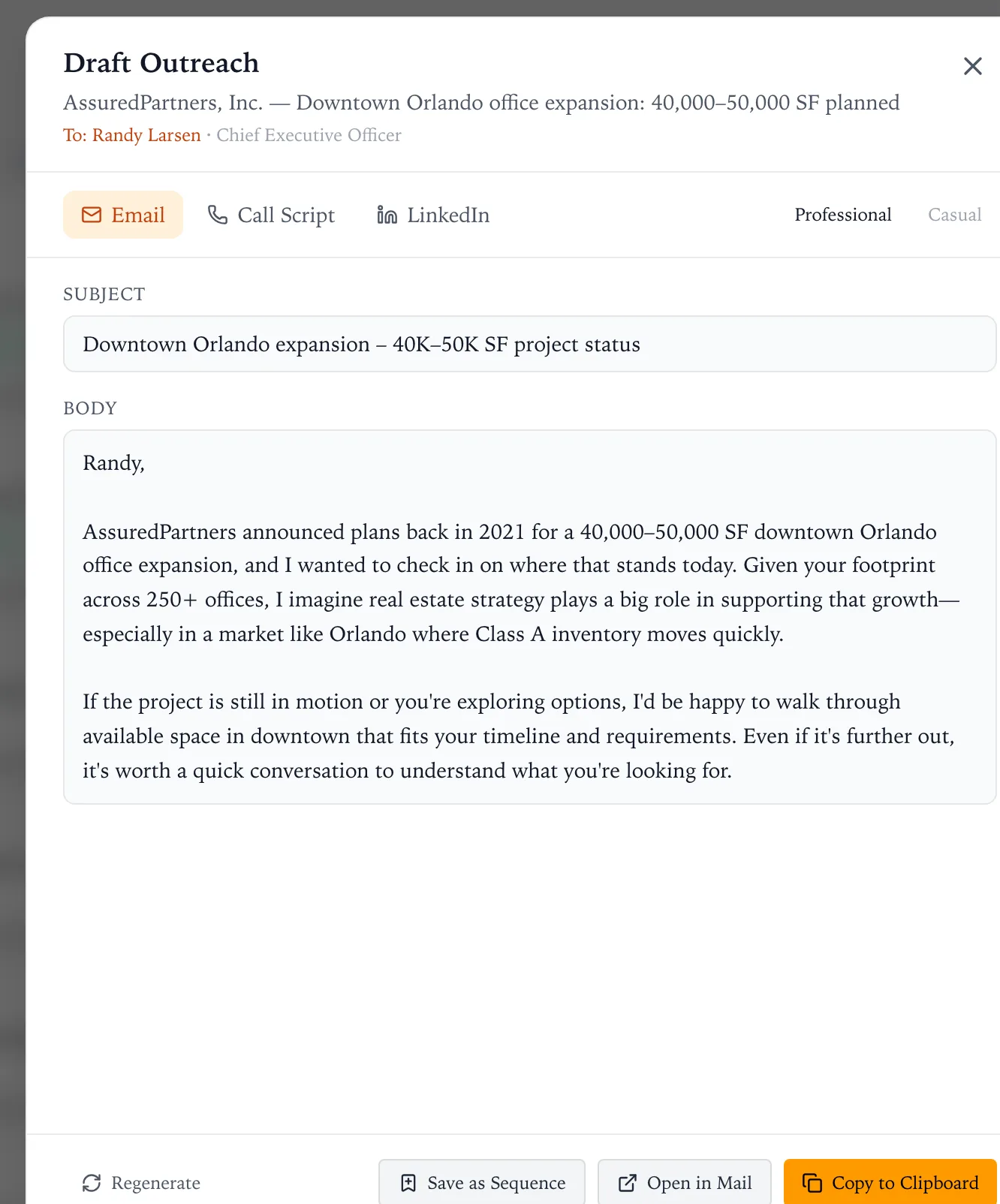
| Draft outreach | Writes a first email, call script or LinkedIn message about this specific event, addressed to the contact. |
| Contacted | Logs that you reached out. The company leaves your call list for now and its "last spoke" date resets. |
| Pipeline | Adds the opportunity to your Pipeline and marks the company as in conversation, so it stops appearing in the Brief. |
| Build Tour Book | Starts a Tour Book for the company with the requirement filled in from the signal. |
| Skip | Removes the row and records it as not useful, which helps tune what you see later. |
 1
2
3
4
1
2
3
4
- 1Pick the channelEmail, a phone script for the call, or a short LinkedIn note.
- 2Pick the toneProfessional or Casual, depending on how well you know them.
- 3Specific, not a templateThe draft uses the event itself: "Based on your move to your current space in early 2022, your lease is likely coming due around January 2027…" Edit anything before you send.
- 4Send it your wayCopy to clipboard, open in your mail app, or save it as a follow-up sequence. Regenerate for a different take.
Client Watch
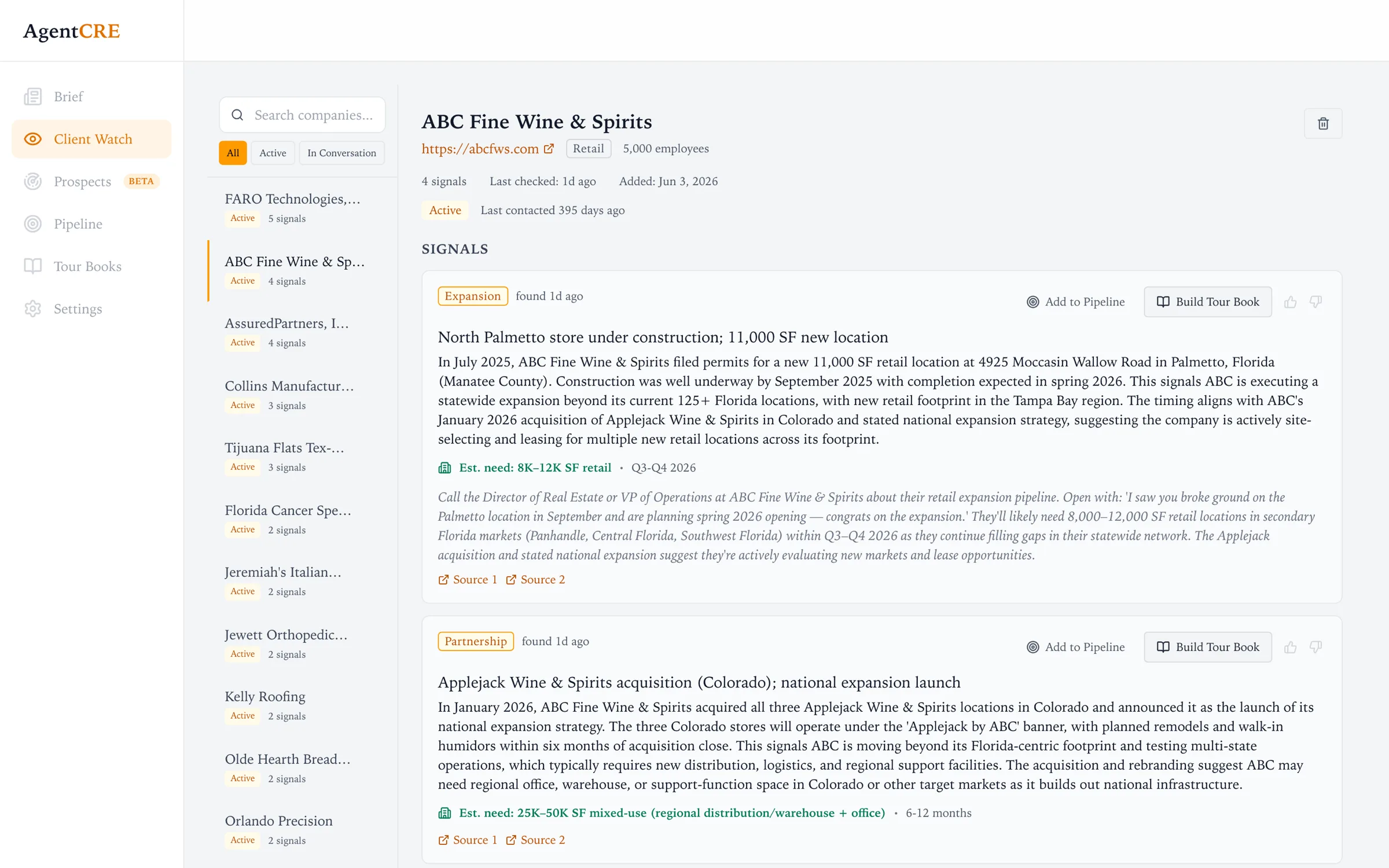
The full record for every company you watch: everything AgentCRE has found, where each finding came from, and where the relationship stands.
 1
2
3
4
5
1
2
3
4
5
- 1Filter by relationshipAll, Active, or In Conversation. Companies you're already working drop out of the daily list automatically.
- 2Your whole bookSearch any company and see how many signals each one has.
- 3Relationship statusWhen it was last checked and when you last made contact.
- 4Findings with contextEach signal has the full story, estimated space and timing, a suggested approach, and sources.
- 5Act from here tooAdd to Pipeline, build a Tour Book, or give a thumbs up or down to tune future results.
Prospects: who's in this area?
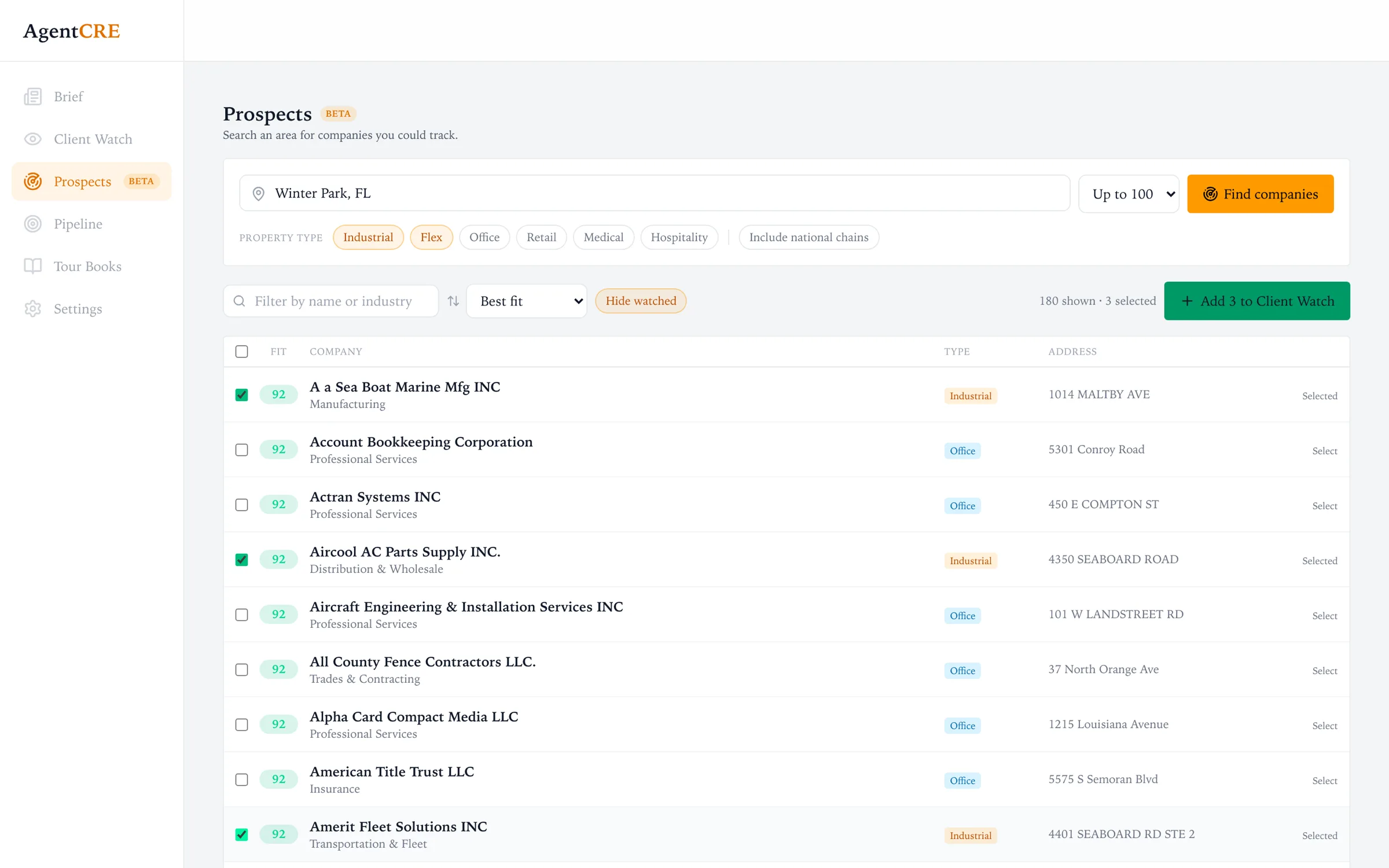
This is where new companies come from. Type a city, county or ZIP code and AgentCRE lists the companies operating there that match the property types you work. Pick the ones you want and add them to Client Watch, and they show up in your Brief from then on.
 1
2
3
4
5
1
2
3
4
5
- 1Search an area"Winter Garden, FL", "Orlando", "32819" or "Orange County, FL". Choose up to 100 results, then Find companies.
- 2Your property typesIndustrial, Flex, Office, Retail, Medical, Hospitality. National chains are left out unless you include them.
- 3Fit scoreHow well each company matches the property types you work. Best fits sort first.
- 4Real addressesEvery company comes from a public business or facility registry with a street address, so you're never chasing a made-up lead.
- 5Add to Client WatchTick the ones you want. They join your book and get watched like everyone else. Companies you already watch are hidden.
A search usually takes 10–40 seconds. If the public registries are slow, you'll see a note saying so. Run the search again to fill in the rest.
Pipeline
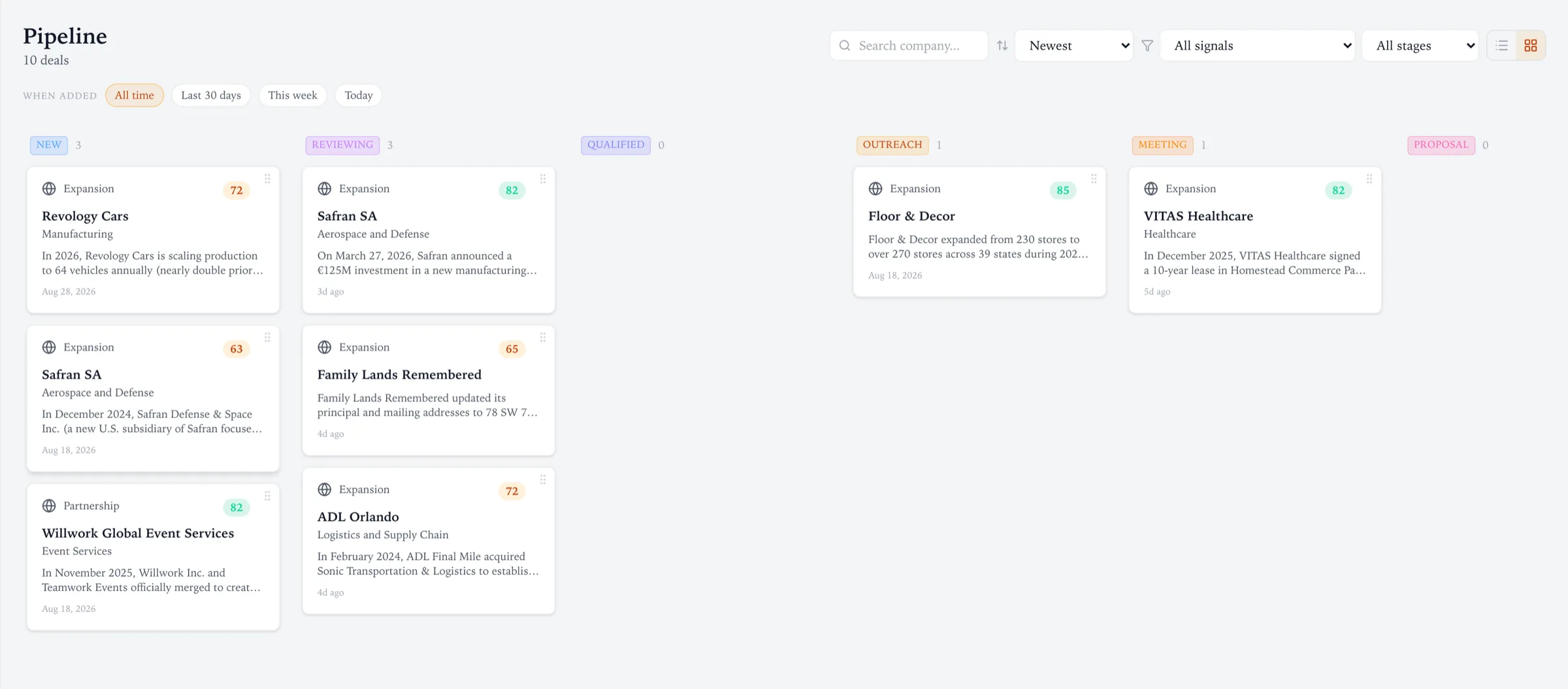
Anything you add from the Brief lands here. Drag a card from stage to stage as the deal moves, from the first conversation to the signed lease.
 1
2
3
4
5
1
2
3
4
5
- 1Find a deal fastSearch by company, sort (newest, highest score, stage, A–Z), and filter by signal type or stage.
- 2When addedAll time, last 30 days, this week or today. Cards added in the last few minutes are highlighted.
- 3StagesNew → Reviewing → Qualified → Outreach → Meeting → Proposal → Won or Lost.
- 4ScoreHow strong the original signal was, so the best opportunities stand out in a crowded column.
- 5Board or listSwitch between this board and a sortable list.
Tour Books
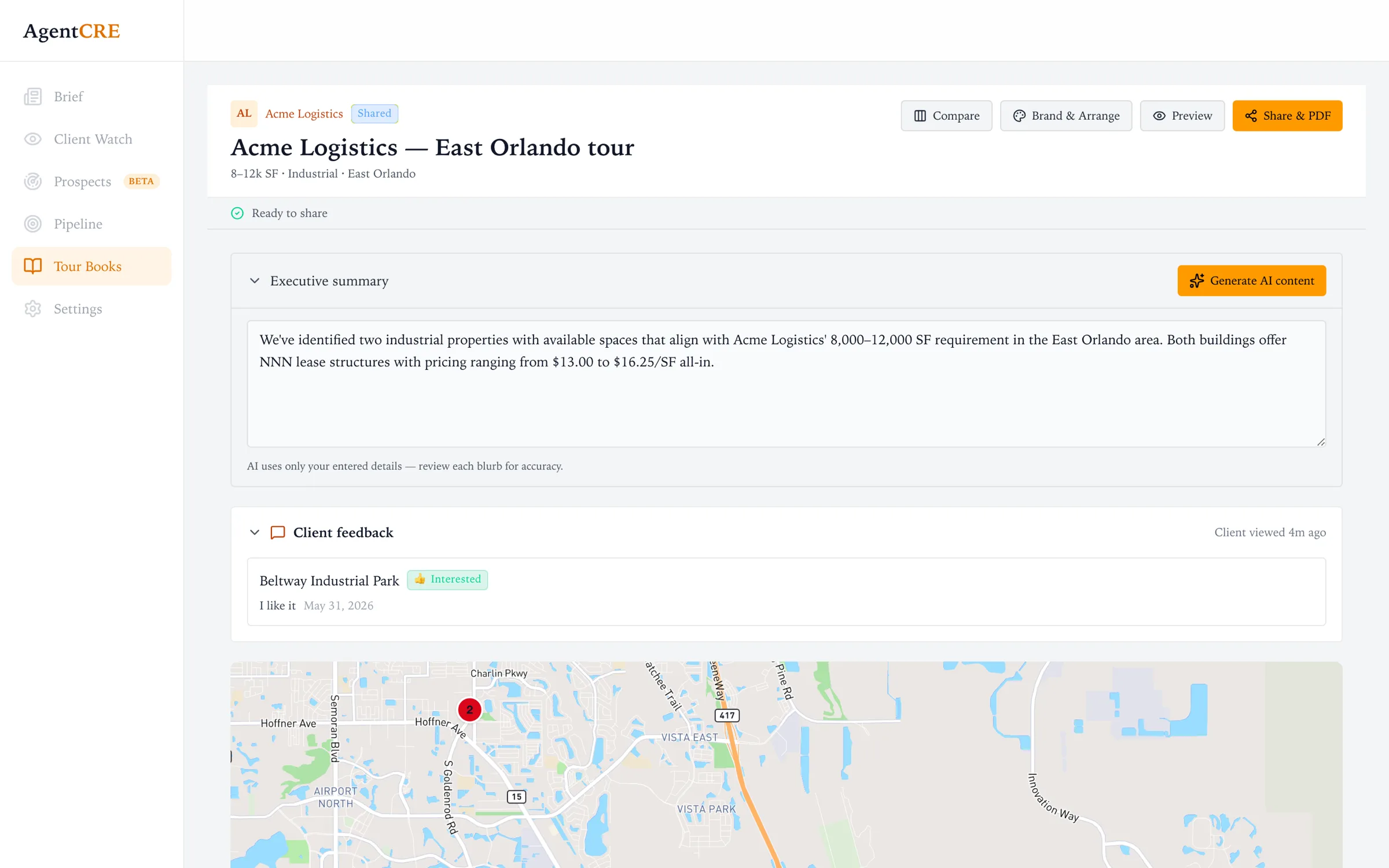
When a client is ready to look at space, build a branded Tour Book in minutes: buildings on a map, every space priced out, and a link your client can open on their phone.
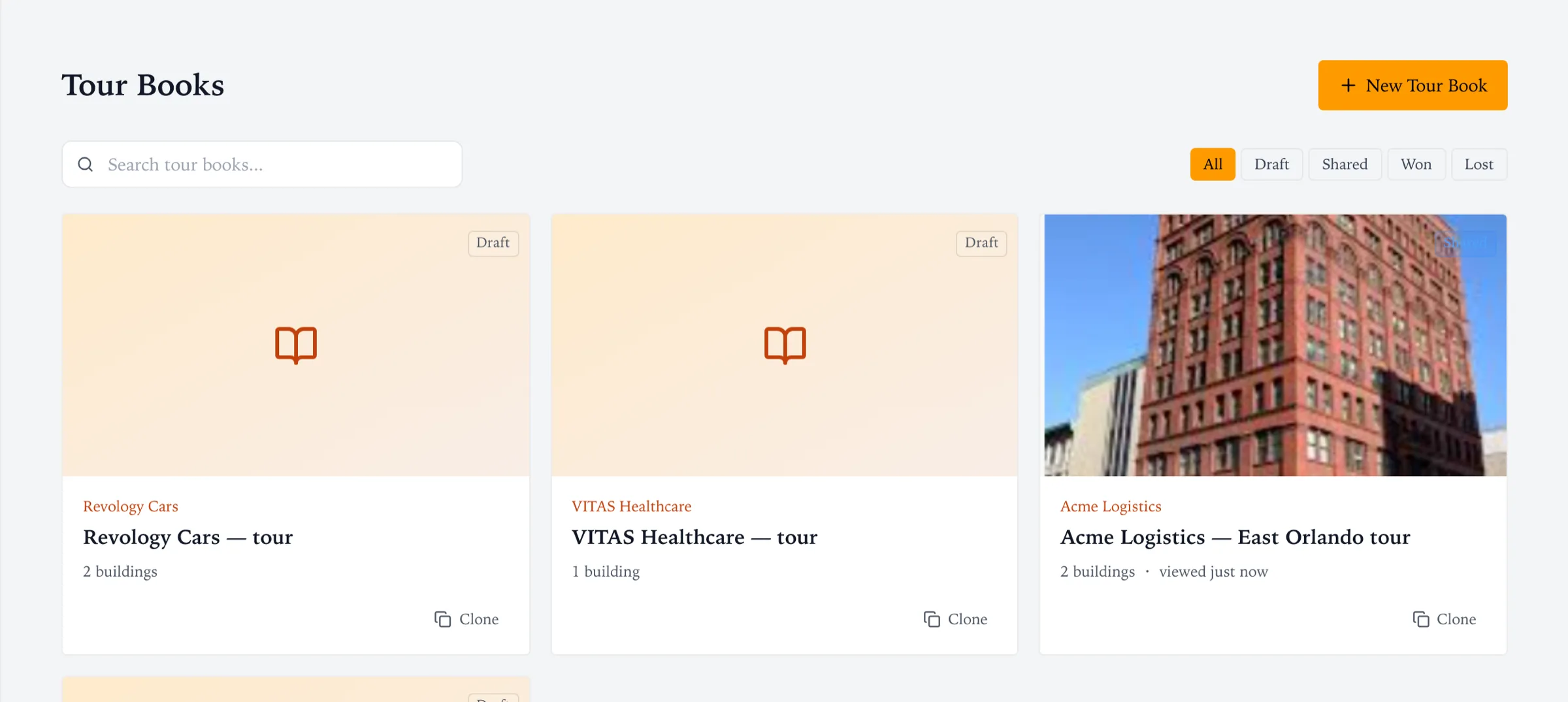
 1
2
3
4
5
1
2
3
4
5
- 1The requirementSize range, property type and area ("8–12k SF · Industrial · East Orlando") keep every space checked against the brief.
- 2Executive summaryGenerate a first draft from the buildings you've entered, then edit. It only uses the details you provide.
- 3Client feedbackSee which buildings your client marked Interested or Pass, their notes, and when they last opened the book.
- 4Compare, brand, previewPut spaces side by side, add your firm's logo and color, reorder buildings, and preview exactly what the client will see.
- 5Share & PDFSend a private link or download a PDF for the tour.
What your client sees
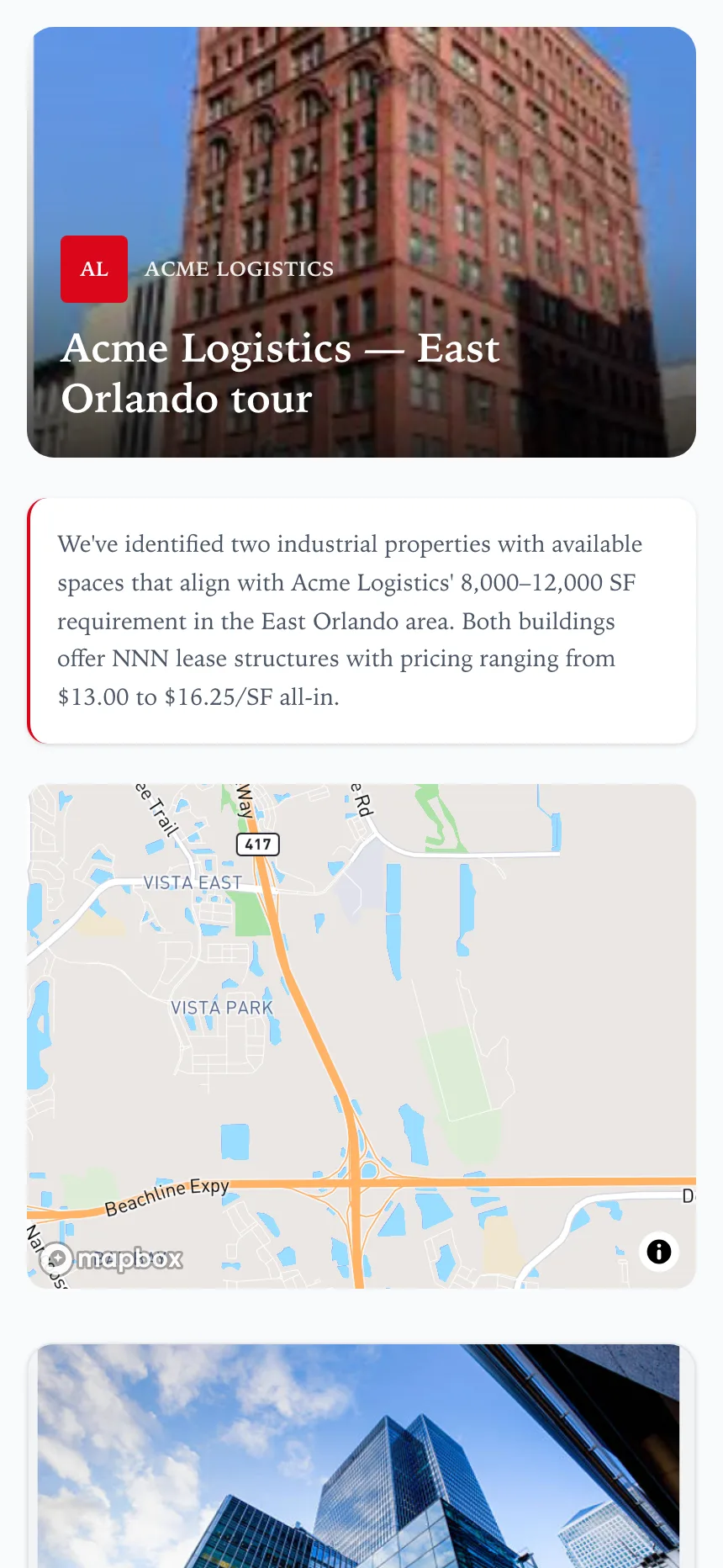
Your branding, your summary, every building on the map.
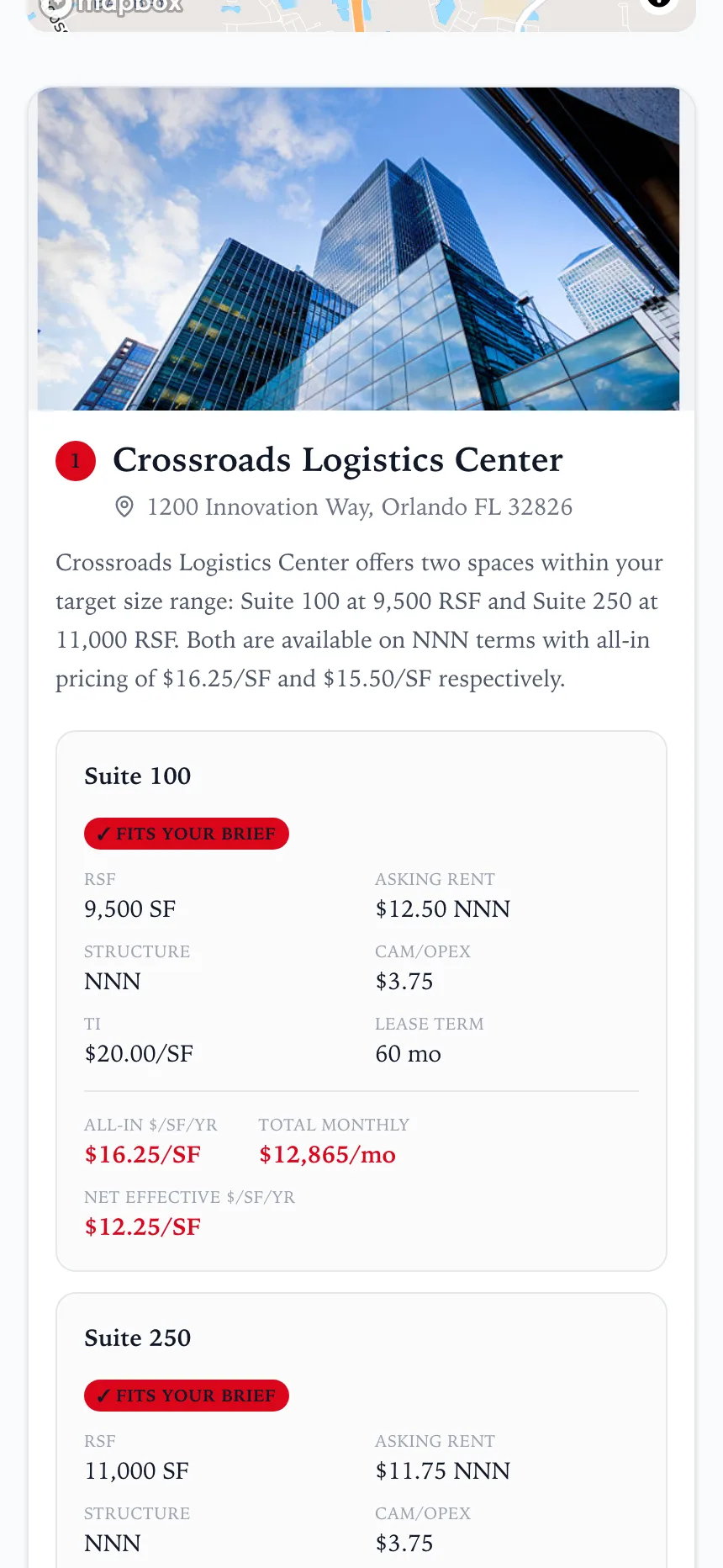
Each suite priced out: all-in $/SF, monthly cost, net effective.
- ✓Fits your briefSpaces inside the client's size range are marked, so they can see at a glance why each one made the list.
- $The math, doneAsking rent, CAM, TI and term roll up into all-in cost per SF, total monthly rent and net effective rate. No spreadsheet needed.
- 👍Interested or PassClients react to each building and leave a note for you. It shows up in your builder right away.
Settings
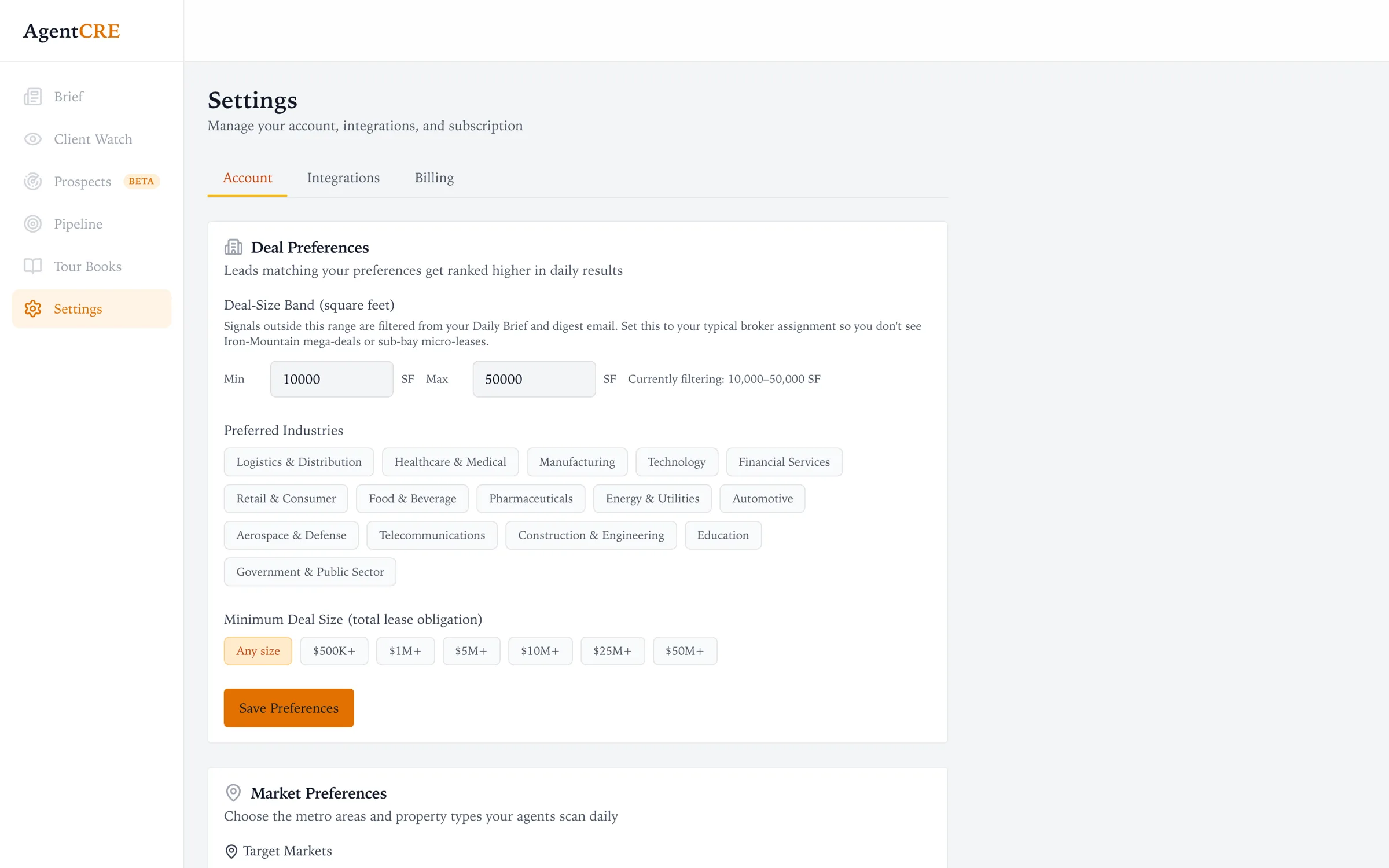
Tell AgentCRE what kind of deals you do so the best fits rank first. Settings has three tabs: Account, Integrations and Billing.
 1
2
3
1
2
3
- 1Account, Integrations, BillingConnect Salesforce or HubSpot to bring in your companies, and manage your subscription.
- 2Deal-size bandThe square footage you typically work. Opportunities in your range rank first. Larger or smaller ones still appear, just lower.
- 3Industries & marketsChoose preferred industries, your target metro areas and property types. Your property types also set what Prospects searches for.
Questions brokers ask
Where does the information come from?
Public sources: news coverage, press releases, company announcements, building permits and business registries. Every finding links to its sources, so you can check it before you call.
Will it hide companies from my list?
No. Your book is your book. AgentCRE ranks what it finds so the most actionable items come first, but it never removes a company you've chosen to watch. Weaker findings are still one click away under Show low-confidence.
How often are my companies checked?
Newly imported companies are researched right away. After that, AgentCRE re-checks your whole book on a rolling basis, spread out through the month, so there's something new most mornings.
What happens after I mark a company Contacted or add it to Pipeline?
It leaves your daily call list so the Brief stays focused on people you haven't reached yet. Deals in Pipeline are tracked there, and the company stays visible in Client Watch.
Are the space estimates and lease dates exact?
They're estimates, and they're labeled that way. Space needs come from the size of the event and typical space per employee for the industry. Projected lease dates are tagged Estimated. Use them to open the conversation, then confirm on the call.
Do I need to set up or run any "agents"?
No. Import your companies and set your markets once. AgentCRE runs in the background and the results show up in your Brief and morning email.
Ready when your book is. Import it and read tomorrow's Brief.
Want to see it on your own companies? Book a 20-minute demo and we'll import five of your clients live.